
A visitor lands on your website with a question: “Do you offer the service I need?” A contact form lets them send that question. An AI chatbot can help answer it while they are still on your site—and give you a way to continue the conversation.
For a business or personal website that regularly receives questions before an inquiry, AMP Spark Pro is the stronger fit when you want approved-information answers, contact capture, and organized follow-up in one managed service. A basic contact form remains useful for visitors who already know what they want to send.
We build and manage AMP Spark Pro, so this comparison reflects that perspective. Here is what each approach does, where our service helps, and when a form is enough.
The difference: send a message or start a conversation
A basic contact form collects fields such as a name, email address, and message, then sends or stores the submission. The visitor generally waits for a person to reply. Forms can be available at any hour; availability alone does not mean the visitor receives an answer.
An AI website chatbot responds conversationally using configured information. What it can answer, when it collects contact details, and whether a person can take over vary by product.
AMP Spark Pro brings those pieces together. It asks for a name, email, and phone number before answering, uses approved business knowledge, and keeps visitor details with the conversation in your dashboard. Your team can review the history and take over when needed.
This article compares AMP Spark Pro with a basic standalone contact form. Advanced form platforms can add conditional questions, payments, scheduling, and integrations; those are different comparisons.
AI chatbot vs. contact form at a glance
| What matters on your website | Basic contact form | AMP Spark Pro |
|---|---|---|
| Collect an inquiry at any hour | Yes, when the form is working | Yes, when the service is available |
| Answer a visitor’s question during the visit | Usually requires a later reply | AI answers from approved knowledge when available |
| Collect contact details | Fields you choose to require | Name, email, and phone before answers |
| Keep the conversation for follow-up | Initial submission; later replies depend on your tools | Contact details and chat history together |
| Organize lead progress | Requires another tool or additional form features | New, contacted, qualified, and closed statuses |
| Send scheduled lead recaps | Requires extra automation | Optional lead summaries with delivery days, time, time zone, and recipient controls |
| Let a person join the chat | Requires a separate chat tool | Team members can claim and reply to a conversation |
| Setup and upkeep | Configure fields, delivery, and spam protection | Managed service with approved knowledge to keep current |
| Cost | May be included with your site; paid tools vary | $50/month; review expected usage and service details with us |
The practical advantage: a form records what someone wants to ask. AMP Spark Pro can help them understand your services and preserve the conversation that follows.
What the research says about quick answers
Two figures help explain why website conversations deserve attention:
of customers prefer self-service for simple issues.
of customers expect immediate interaction when contacting a company.
Both figures come from Salesforce’s August 2023 State of the Connected Customer research, as reported in its customer touchpoints article. These are broad customer expectations, rather than a test of AMP Spark Pro or proof that a chatbot converts better than a form. The self-service figure includes options beyond chatbots, and an automated answer is not equivalent to speaking with a person.
For your website, the useful takeaway is to make routine information easy to find and keep human follow-up straightforward. You should measure results on your own site rather than assume an industry statistic will become your conversion rate.
Where AMP Spark Pro offers more than a form
1. Help visitors while the question is fresh
Someone considering a landscaper may ask about service areas or commercial work. A potential client on a photographer’s portfolio may ask which kinds of projects the photographer accepts. A consultant’s visitor may want to understand the difference between two services.
A form passes those questions to your inbox. AMP Spark Pro can answer from information you approve while the visitor is deciding what to do next. Your published services, website pages, documents, and direct notes become the starting point for helpful answers.
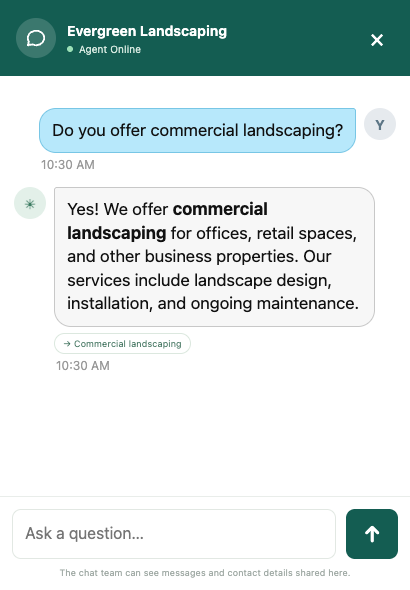
The chatbot still needs accurate, current information. It cannot make an unknown appointment available or turn an unpublished estimate into a confirmed quote. Questions outside its knowledge need your team’s attention.
2. Keep a way to reconnect
An anonymous conversation can be helpful, but it may leave you without a way to follow up. AMP Spark Pro requests name, email, and phone before answers, then keeps those details with the chat.
For a business owner, that means you can review what the person asked before reaching out. For a freelancer or creator, it gives project inquiries somewhere to go beyond a chat bubble.
There is a tradeoff: requiring three contact fields can discourage visitors who only want to browse anonymously. For sites focused on meaningful inquiries, we favor having a way to reconnect. A contact form can also require these fields; AMP Spark Pro’s advantage is connecting them with the continuing conversation.
3. Bring leads and context into one workspace
A form notification is one more email to sort. AMP Spark Pro gives your team a place to review contacts, open their conversations, and track whether a lead is new, contacted, qualified, or closed. Private notes and saved replies support follow-up, and CSV export helps when you need your lead data elsewhere.
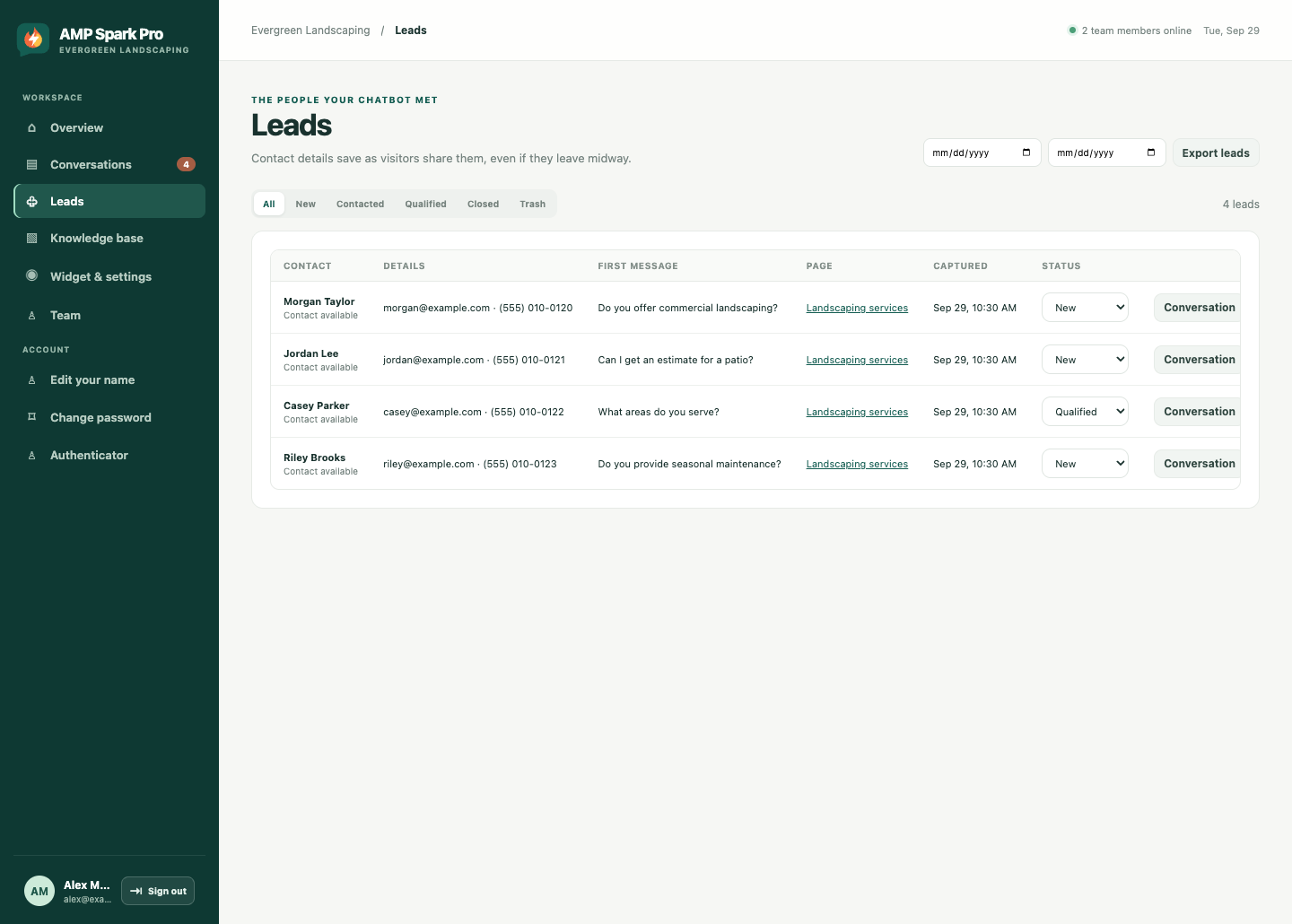
These screenshots illustrate the workflow using sample data. They do not establish lead volume, revenue, or conversion improvements.
4. Make follow-up fit your day
You do not have to keep the dashboard open to catch up on new inquiries. Optional scheduled lead summaries email new contact details, brief AI-assisted conversation recaps, and links to the original conversations.
You choose the delivery days, time, time zone, and destination email in the dashboard. A weekday schedule carries weekend leads into the next scheduled report. No new leads means no extra summary email. Read the full chat when a recap needs more context.
That is useful when you are on a job site, meeting clients, or balancing your personal website with other work. It helps you prepare for follow-up; it does not replace actually contacting the visitor. Explore lead summary features.
5. Get a managed service instead of another project
You need more than an installed chat bubble: the greeting, approved information, contact flow, and answers all need to fit your website. AMP Spark Pro is built and managed by AM Perspectives, with a team you can contact about setup and your service.
Our published price is $50 per month, bringing managed AI chat, contact capture, lead tracking, scheduled lead summaries, and your widget branding without an AMP Spark Pro “powered by” credit into one service. A basic form may cost less or already be included with your website; the value here is the answering and follow-up workflow you receive alongside it. We review your website and expected usage with you before starting. See pricing and the questions to ask before signup.
Which websites are the best fit?
Service businesses: AMP Spark Pro makes sense when visitors ask about service areas, offerings, preparation, or how to get started—and your team wants their contact details and conversation before following up.
Personal brands, freelancers, and portfolios: it can help explain your work, services, and project process using information you approve. It is most useful when your site is intended to generate client inquiries, bookings to discuss, or professional opportunities.
Creators and informational sites: the value depends on your goal. If your audience mainly wants to read anonymously and rarely contacts you, required contact capture and a monthly service may be more than you need.
When a contact form is enough
A simple form can be the right choice when you receive occasional messages, visitors already have enough information to write an inquiry, or you need a structured submission rather than a conversation. Applications, file-heavy requests, and detailed questionnaires may call for a specialized form tool.
You can also keep both. Give visitors a clear contact page for a direct message and add AMP Spark Pro for questions that arise elsewhere on the site. Let people choose the route that suits them.
How to decide whether it is working
Track usable inquiries, how many visitors complete contact capture, the questions they ask, and how quickly your team follows up. Compare qualified leads and resulting work against the cost and time involved. Look at abandoned contact steps as well as completed chats.
We are not claiming a measured conversion increase in this article. Your traffic, audience, knowledge quality, and follow-up process will determine the outcome.
Common questions
Does an AI chatbot replace my contact form?
It can become your main route for website questions, but you can keep a form for direct messages or structured requests. AMP Spark Pro adds answers, conversation history, and lead management alongside contact capture.
Can AMP Spark Pro help when I am away from my desk?
It can answer from approved information when automated answering is available, and you can enable scheduled lead emails. Requests that need a person still need your follow-up; this is not a promise of a staffed human response at every hour.
Is it suitable for a personal website?
Yes, especially a portfolio, freelance business, or personal brand seeking inquiries. A hobby site with occasional messages may be better served by a basic form.
Does it guarantee more leads?
No. It gives visitors another way to get information and gives you tools for capturing and following up on inquiries. More leads or sales are outcomes to measure, not guarantees.
Give website questions somewhere useful to go
If your visitors need answers before they are ready to send an inquiry, AMP Spark Pro offers a more complete path than a basic contact form: approved-information answers, contact details, conversation history, and follow-up tools in one managed service.
Explore the features or tell us about your website. We will review whether AMP Spark Pro fits the way you want visitors to reach you.
Comparing chat platforms next? Read AMP Spark Pro vs. tawk.to: Which Fits Your Website?.